Use-case tutorials
Member integration flow
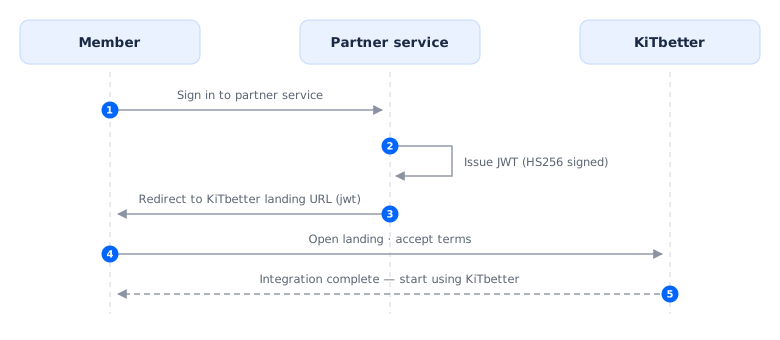
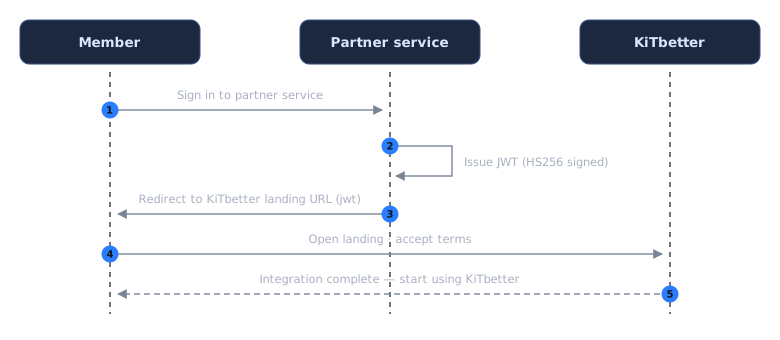
The most basic use case: linking a partner service account to a KiTbetter account. For the full specification, see Member integration.
The partner only implements steps 2 and 3 (issue a token, redirect). KiTbetter handles everything after that.
Step 1 — Partner onboarding
Request onboarding through the contact channel to receive your JWT signing secret and the landing URL to redirect to. Test environment details are provided at the same time.
Step 2 — Issue a token
Build a JWT from the signed-in member's information (required: iss, sub, email, exp). Sign it with HS256.
{
  "iss": "your-service.com",
  "sub": "partner-member-0001",
  "email": "user@your-service.com",
  "name": "Jane Doe",
  "iat": 1778578868,
  "exp": 1778582468
}
Step 3 — Redirect the user
Append the token to the landing URL you received during onboarding and send the user there. That is the full extent of the partner implementation.
https://kitbetter.com/partners/accept-terms?jwt={TOKEN}
KiTbetter handles the rest, and the integration completes once the member accepts the terms.
Album ingest → release flow
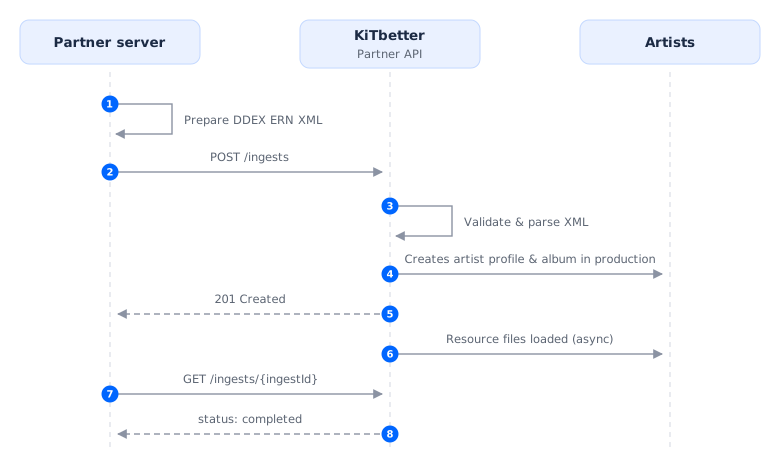
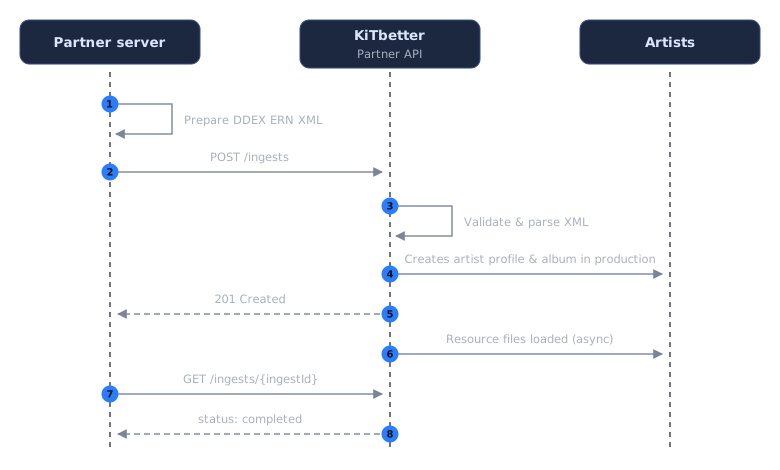
The end-to-end use case for releasing an album you own as a KiTalbum on KiTbetter. The partner only implements steps 1 to 3 (prepare the XML, call ingest, check status); the final steps are done by the artist who arrives through member integration. For request and response details, see the album ingest reference.
Step 1 — Prepare the ERN XML
Assemble your album and artist metadata as DDEX ERN 3.8.2 XML and create a presigned URL that KiTbetter can download. URLs for resource files such as audio, video, and images go inside the XML under <TechnicalDetails><File><URI> — do not send them separately in the request body.
Step 2 — Call the ingest API
Send releaseId (your album ID) and xmlUrl to POST /ddex/ingests. The response can take up to 30 seconds, so set your client timeout to at least 30 seconds.
A 201 response means an album in production has been created. Track the ingest with the ingestId in the response. Resource files are loaded asynchronously after the response. Resending the same releaseId returns 409, and a problem with the XML returns 422 (no ingest is created, so you can resend) — see error codes.
Step 3 — Check the ingest status
Audio and image files referenced in the XML are loaded asynchronously after the response. Use the ingestId to check progress.
curl "https://api.kitbetter.com/partner/v1/ddex/ingests/1042" \
  -H "X-API-Key: YOUR_API_KEY"
{
  "ingestId": "1042",
  "releaseId": "DIST-2026-00123",
  "status": "processing",
  "receivedAt": "2026-08-06T10:38:00+09:00",
  "completedAt": null,
  "resources": { "total": 14, "completed": 9, "failed": 0 }
}
Once status becomes completed, the artist can pick up the work. We recommend a first lookup about 30 seconds after ingest, then every 30 seconds to 1 minute. If the status is failed, check error.code for the reason and — instead of resending — contact us.
Instead of polling, you can register a webhook to receive completion and failure events in real time.
Step 4 — The artist finishes up
The artist signs in to KiTbetter through member integration, adjusts the package design in Artists, and completes the release flow — at which point the KiTalbum goes live on Shop.